Microsoft Power BI Overview
Introduction
“Welcome to the Beginner course on Microsoft Power B.I. I’m delighted to have you here as we explore how Power B.I can transform raw data into interactive dashboards and reports.Over the next few minutes, we’ll dive into what Power B.I is, the various components that make up the Power B.I ecosystem, and how these tools fit into the broader Microsoft family of business applications.
By the end of this lesson, you’ll have a clear understanding of why Power B.I is such a powerful analytics platform, and you’ll be ready to move forward into hands-on work with the software.”
What is Power B.I?
- “Power B.I is a collection of business analytics tools designed to help you analyse data and share insights.
- Whether your data is stored in Excel spreadsheets, cloud-based services, or on-premises databases, Power B.I makes it simple to connect, visualise, and collaborate on that information.
- It’s backed by Microsoft, ensuring regular updates, tight integration with Office 365, and a robust support community.”
Key Benefits and Uses
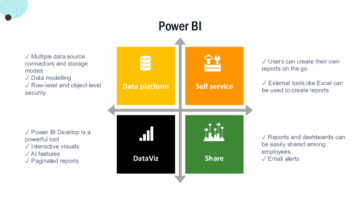
- Data Consolidation: “Bring data together from multiple sources, regardless of format or location.”
- Real-Time Insights: “Create dashboards that update automatically, providing up-to-the-minute information for decision-making.”
- Interactive Visuals: “Turn complex data sets into clear, visually engaging charts, maps, and graphs that help you spot trends quickly.”
- Collaboration and Sharing: “Easily share your findings with team members or stakeholders, either in the Power B.I Service or directly within apps like Microsoft Teams.”
Components of the Power B.I Ecosystem
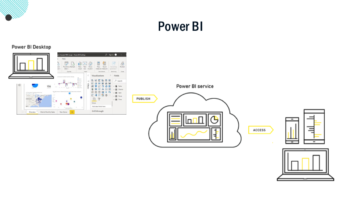
- Power B.I Desktop: “A free Windows application you install on your computer to build data models and reports.”
- Power B.I Service (Online): “A cloud-based platform where you can publish, share, and manage your Power B.I reports and dashboards.”
- Power B.I Mobile: “Mobile apps for smartphones and tablets, enabling on-the-go access to real-time dashboards.”
- Power B.I Report Server (Optional): “An on-premises solution for organisations that need to keep data behind their own firewall.”
Lesson Recap
“To summarise, Power B.I is a versatile, user-friendly business analytics platform that integrates seamlessly with Excel, Microsoft 365, and many other data sources. Its interactive visuals and sharing capabilities make it an essential tool for data-driven decision-making in modern organisations.”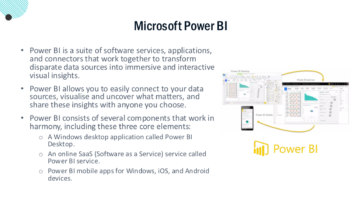
Transition to Next Lesson
“Now that you understand the basics of Power B.I and what it can do, let’s move on to exploring Power B.I Desktop. In our next lesson, you’ll learn how to install and navigate Power B.I Desktop, and we’ll start connecting to data sources so you can see Power B.I in action!”